
 zappi GLO
 zappi
zappi eddi
eddi eddi+
eddi+ libbi
libbi harvi
harvi View all our products

Charge cheap.
Get rewarded £5-10 every month.
It charges your EV at the cheapest times based on your tariff, and we’ll reward you each month for supporting the grid.
Check the myenergi app to see if you’re eligible and sign up!
How does Gridpay work?
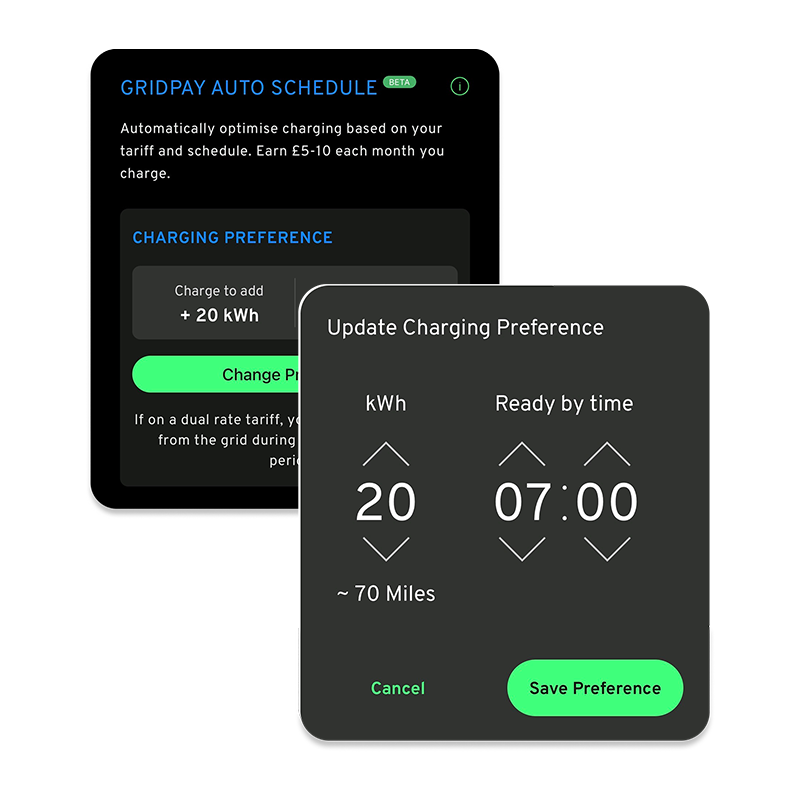
Gridpay replaces your previous zappi app screen to help you earn while getting the charge you need.
- Tell us how much charge you need and when you need it by
- Your EV charges based on your preferences & tariff at the cheapest time
- Get rewarded £5-10/month while getting the charge you need
Check the myenergi app to see if you’re eligible and sign up!
Need a top-up?
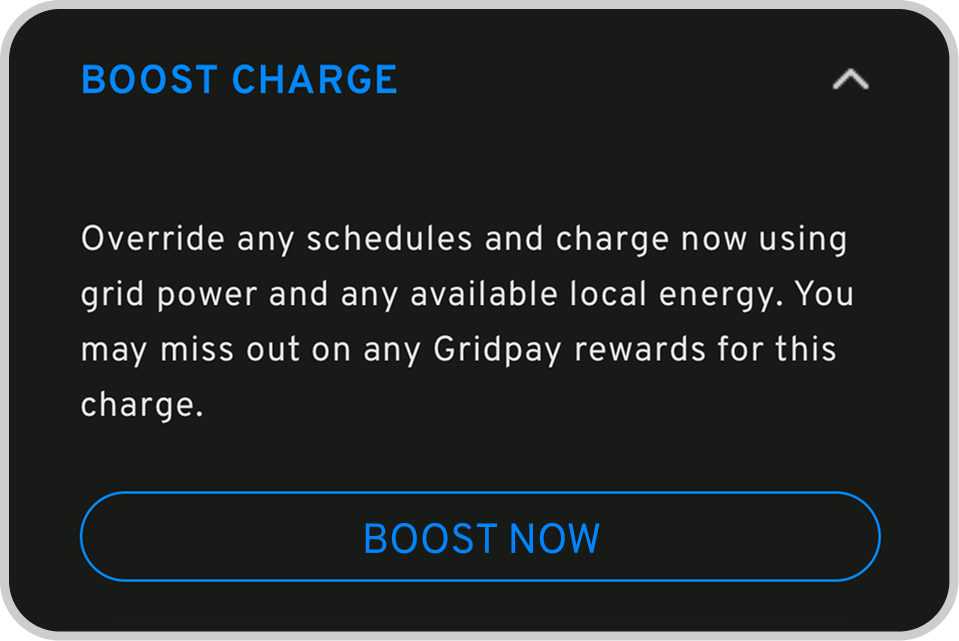
If you ever need immediate charging, just hit Boost Now. It gives you instant control when you need it most.
GRIDPAY BY MYENERGI
How much will you be rewarded?
You’ll be rewarded £5-10 every month while you get the charge you want at the cheapest times for you. It’s that easy.
Check the myenergi app to see if you’re eligible and sign up!


It’s FREE!
You’ll charge when it’s cheap for you and we’ll reward you for helping the grid. We’ll take care of everything for you.
Check the myenergi app to see if you’re eligible and sign up!
Frequently Asked Questions
These FAQs cover the most frequently asked questions about Gridpay and our partnership with Axle.
For any other questions or issues, please contact our team at gridpay@myenergi.com.
Gridpay is myenergi’s grid flexibility service. Once signed up, we automatically adjust your zappi charging when the grid is under strain. In return, you earn rewards for your participation.
Open the myenergi app to check whether you’re eligible. If you are, you’ll see a banner or pop-up inviting you to join Gridpay. If you’ve previously dismissed this, you can also start the sign-up at any time by going to Settings → Gridpay and following the onboarding steps.
If you’re not eligible, you won’t see the Gridpay option in the app at this time.
No, this will never cost you money. We will optimise your charge with your tariff in mind.
We will only charge your EV during your cheapest available window. So, if you’re on a two-rate tariff, it will only charge during your overnight off-peak period, or for those with solar panels, whenever you have excess solar available.
If you need more charge, you can always hit the ‘boost now’ button in the app.
Gridpay isn’t currently available to everyone, but we’re working to expand the programme to more customers.
If your home meets the Gridpay eligibility requirements, the option will appear automatically in your myenergi app. If you don’t see Gridpay in the app, it likely means your current setup isn’t eligible yet.
Please note:
Homes already using a smart EV tariff, such as Intelligent Octopus Go or OVO Charge Anytime, aren’t eligible for Gridpay. These tariffs already manage charging automatically, so Gridpay won’t appear in the app.
No. Smart tariffs already adjust your charging, and may be participating in grid services on your behalf.
Gridpay Auto Schedule handles all your charging optimisation automatically based on your tariff – you’ll no longer need manual schedules.
If you need to charge immediately, just hit the “Boost Now” button in-app.
Have more complex charging needs? Contact our support team at gridpay@myenergi.com.
No, we won’t drain your battery.
You’ll earn £5-10 every month you use Gridpay Auto Schedule.
You’ll receive your rewards at the end of every month you use Gridpay Auto Schedule. You can redeem your rewards once your balance is more than £10.
At the end of each month that you’ve participated, you’ll receive an email with a link to your Gridpay Rewards. From there, you will be able to redeem your rewards via bank transfer (we’ll ask you for your bank details when you’re cashing out). You can access this page at any time.
You can easily opt out of Gridpay in the myenergi app. Simply open Settings, select Gridpay > Deactivate, and follow the on-screen steps.